
Employee Management
On this page
One of the most important assets a company has is its human capital. A properly managed company will always have a high-quality Human Resources department. Properly managing employees and their various needs and keeping track of their work patterns can lead to better and more productive employees. The HR module in Aqxolt ERP allows you to maintain a complete employee database that includes employees’ contact information, pay details, performance evaluation details, and attendance details.
Create Employee:
- Navigate to the HR Management app > Employees tab.
- Once in the Employees tab, you can track/view the employee information already filled in and create a new employee record.
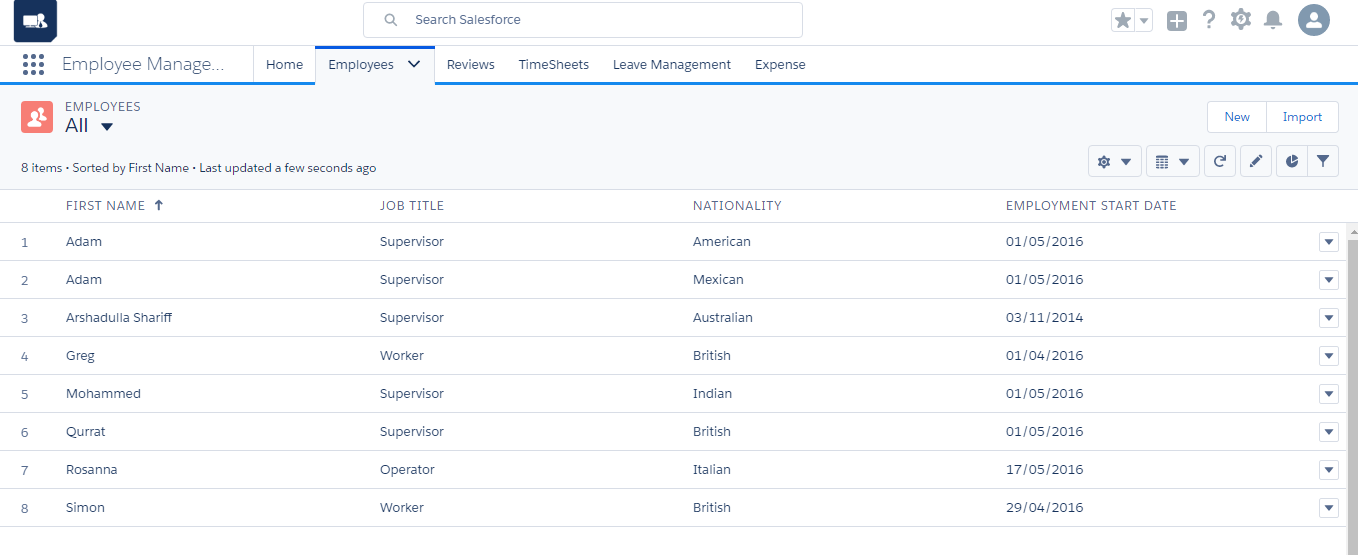
- To create a new employee, click the “New” button.
- Select the organisation and business unit where the employee belongs
- Enter the employment details in the Employment Information section.
- Enter other information about the employee, such as contact details, nationality, date of birth, passport details, and social security number.
- Click the “Save” button to create an employee record in the organisation.
With the Aqxolt ERP, the enterprise can effortlessly manage the following key elements of employee management:
- Payroll
- Qualifications
- Taxes
- Expenses
- Timesheets
- Performance reviews
- Approval processes
- Profiling
- Leave entitlements
- Earnings
- Costs
- Commissions/Bonuses
Aqxolt ERP prides itself on setting a benchmark in the complete automation of employee management. As soon as a new employee joins the enterprise, the system calculates and manages wages from the date of his or her joining. This, and a host of other features makes the HR module as accurate and autonomous as possible.
Fields to note:
| Field | Description |
| No of Hours/Day | Describes the number of working hours per day |
| Maximum Overtime Hours/Day | Describes the maximum allowed overtime hours per day |
| First Name | Describes the first name of the employee |
| Last Name | Describes the last name of the employee |
| Middle Name | Describes the middle name of the employee |
| Gender | Describes the gender of the employee |
| Leave Allowance | Describes the total number of leave allowances applied to the employee |
| Available Allowance | Describes the available leaves for the employee |
| Leave Allowance Take | Describes the leave allowances utilised by the employee |
| Former Employee | Indicates whether the employee is a former employee |
| Former Employee Record | Describes details of the former employee record |
| Employee User | Used to assign a salesforce user to the employee record |
| Employment Status | Describes the employment status of the employee |
| Job Title | Describes the job title of the hired employee |
| Non-Employee Type | Indicates whether the employee is a consultant or apprentice |
| Employment Start Date | Describes the start date of the employee |
| Employment Start Date | Describes the last working day of the employee |
| Contract/Offer Issue Date | Describes the date when the job contract/offer was issued to the employee |
| First Working Day | Describes the first working day of the week assigned to the employee |
| Commission Plan | Describes the commission plan assigned to the employee |
| Organisation Business Unit | Describes the organisation business unit where the employee is hired to work |
| Channel | Describes the segment of the business where the employee is hired to work |
| Reporting Manager | Describes the manager under whom the employee will be working |
| Employee Profiling | Describes the profile of the employee |
| Work Status | Describes the work permit status of the employee |
| Description | Provides more information about the employee |
| Date of Birth | Describes the date of birth of the employee |
| Place of Birth | Describes the place of birth of the employee |
| Marital Status | Describes the marital status of the employee |
| Number of Children | Describes the number of children of the employee |
| Passport Number | Describes the passport number of the employee |
| Passport Expiry Date | Describes the expiration date of the passport |
| Nationality | Describes the nationality of the employee |
| Social Security Number | Describes the social security number of the employee |
| National Insurance Number | Describes the national insurance number of the employee |
| Address | Describes the address of the employee |
| Permanent Address | Describes the permanent address of the employee |
| Phone | Describes the contact phone number of the employee |
| Describes the email address of the employee | |
| Mobile | Describes the mobile number of the employee |
Was this article helpful?