

Process and Process Cycles
A. Process
A process is a functionality used by manufacturing industries to produce finished products, typically in bulk, using bills of materials and assembled components. Axolt provides a complete solution to manage business processes end-to-end, allowing efficient planning of work centers, workforce, and machine hours based on the complexity of the manufacturing process.
Creating Processes:
- Navigate to the Products tab using the App Launcher or find the tab in the App Navigation menu.
- Select the manufacturable product from the Product List, then open the related Routing list.
- In the routing record, click + New Process in the process lookup to create a new process.
- Select the Manufacturing Process record type and click Next.

- Enter the Process Name and click Save to create the process record.
- For reference, select the process Type, choose the Site, Work Center, and enter a Process Description if needed.

Process – Field Description:
| Fields | Descriptions |
| Process | The manufacturing process name. |
| Record Type | Specifies the record type of the process record. |
| Type | Defines the type of the process (Discrete, Process or Repetitive) |
| Site | The storage area where raw materials are received, stored, and issued for production |
| Work Center | The physical location or station where the actual manufacturing process takes place. |
| Process Description | A description of the process |
| Company | The manufacturing company or organization that owns and operates the production facility. |
B. Process Cycles
The Process cycles represent individual manufacturing steps that define how a product is built, with each cycle linked to a specific Work Center and arranged in a precise sequence. Users can connect previous and next cycles to ensure correct production flow, and within each cycle, they can add operations, BOM line items, WIP products, team members, checklists, and attachments. Multiple process cycles can be created to handle complex products with many stages. Once the Manufacturing Order (MO) is scheduled, all defined process cycles are automatically converted into individual Work Orders for execution on the shop floor.
Creating a Process Cycle:
- From the process record, locate and select the Process Cycle related list.
- To create a new process cycle, click the New button.
- The Process name will be auto populated.
- Enter the Process Cycle Name and click Save to create the process cycle.
- For reference, select the Previous and Next Process Cycle (if applicable), then choose the Work Center where this process cycle will begin and enter a clear description of the process cycle if needed.
- Note 1: Check the Enable All Tasks Done Checkbox to complete all from the Work Order Execution screen in one go.
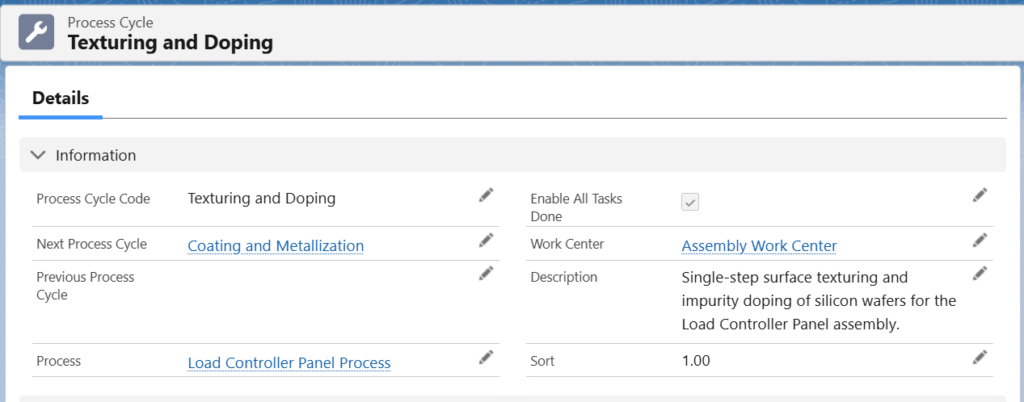
Process Cycle – Field Descriptions:
| Fields | Descriptions |
| Process Cycle Code | Name of the process cycle. |
| Next Process Cycle | The following step in the process. |
| Previous Process Cycle | The preceding step in the process. |
| Process | The manufacturing process name to which the process cycles belong. |
| Enable All Task Done | Allows users to complete all tasks directly from the Work Order Execution screen in one go.. |
| Work Center | The physical location or station where the actual manufacturing process takes place. |
| Description | A description of the Process Cycle |
| Sort | Used to sort and define the order of process cycles. |
The Process and its Process Cycles can be created in just a few clicks from the MO Product Configuration screen — no need to manually fill every field one by one. Simply enter minimal key information and the system instantly generates all related records in seconds.
