
Customer Accounts and their Contact, Address
On this page
This article is not available in Français yet. You are reading the English original.
- Customer Accounts and their Contact, Address: – The Customer Account represents an individual customer or organization involved with the business. The Customer accounts can be used to create the Quotes and the Orders.
Create the Customer Account: –
- Find the Accounts tab from the App Launcher.
- Click on the “New” button, available in the top right-hand corner of the page.

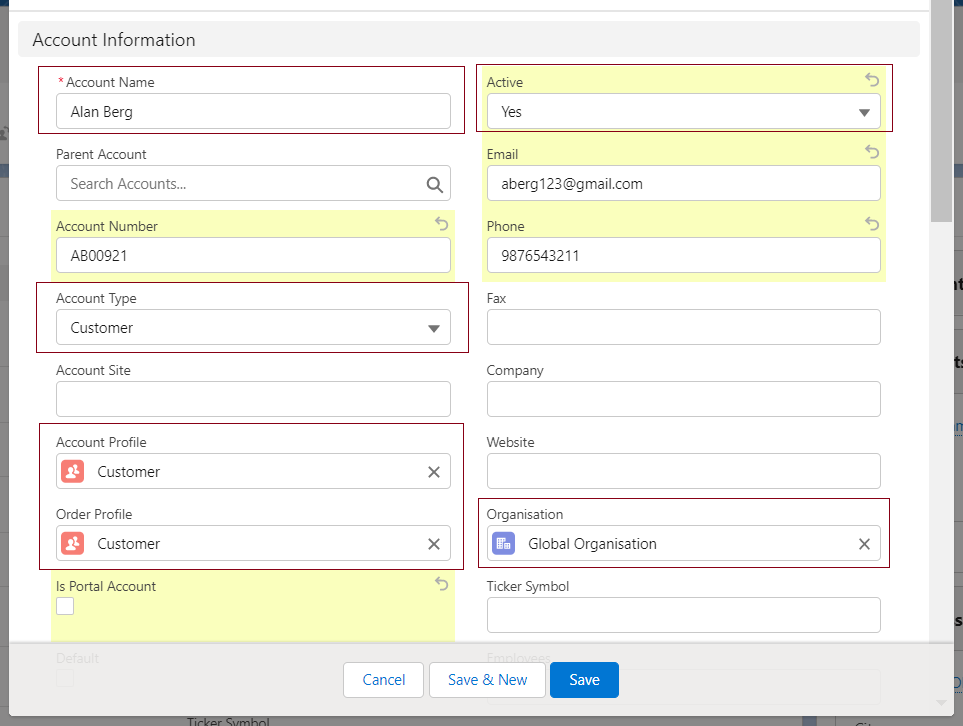
Enter the Name of the Customer in the Account Name field, Account Type should Customer, Select the Account Profile (created customer profile) and the Order Profile (created Order profile), Active field should be checked, Select the Organization (created Organization Account), enter other information if required and click on Save button to create the Customer Account.
Create the Address and the Contact record for Customer Account: – The address can the shipping or the billing address for the created Customer and the Contact is the point of contact for the Customer.
- Open the created Customer Account, go the related list and create the contact and the Address by clicking on the New button.

Was this article helpful?