
Trial Balance
On this page
This article is not available in Deutsch yet. You are reading the English original.
The trial balance helps ensure that the total amount of debits is equal to the total amount of credits. The trial balance shows, for the given organization and general ledger, the account balance as of a selected date, the total sum of debits, and the total sum of credits as of the selected date. At the end of the trial balance report, the total sum of debits must equal the total sum of credits.
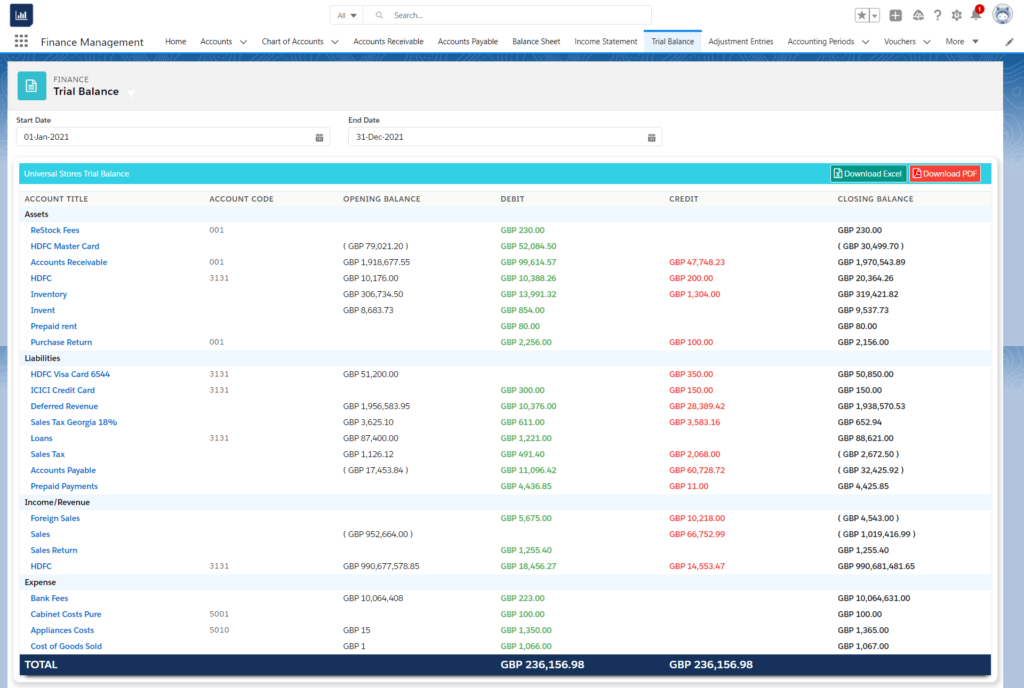
Use the Filters section to view the trial balance for the selected organization and the selected dated specification. Select the organization for which the trial balance is required; the trial balance post transactions of the finance general ledgers inherited by the selected organization. Select the “From” date when the total balance will be considered. Select the “To” date when the total balance will be calculated. The system offers an option to download the trial balance for the selected criteria in PDF/Excel format on your local system; click the “Download Excel/ Download PDF” button.
Was this article helpful?